Install in Claude Code
If you run the Spec Kit commands in Claude Code, the mod keeps the run in view while you work. It shows the same steps, times and task counts as the VS Code viewer and the Copilot app board. You do not need the VS Code extension for this path. The mod draws in the Claude Code terminal and in the Code tab of the Claude Desktop app.
The path has the same shape everywhere: Spec Kit itself, then the Companion extension for Spec Kit, which is optional but recommended, then the one thing your tool needs. Install where you work has the other two places.
Get Spec Kit
Spec Kit is GitHub’s toolkit for spec-driven development. Its
specifycommand sets a project up with the/speckitcommands Claude Code runs.uv tool install specify-cli --from git+https://github.com/github/spec-kit.git --forceThis installs the GitHub build. The stock PyPI
specify-clihas noextensioncommand, so step 2 would fail with it. The command changes your globaluvtools.Then set the project up for Claude Code, from its root:
specify init --here --integration claudeYou should see
A
.specifyfolder in the project, and/speckit-specifyamong the commands Claude Code offers.Add the Companion extension for Spec Kit (optional, recommended)
This is the engine half. It records each run, adds the Companion pipeline and Auto, and brings living specs. It needs Spec Kit 0.9.5 or newer.
specify extension add companion --from https://github.com/alfredoperez/speckit-companion/releases/download/companion-latest/companion.zip --forceRun it from your project root and copy it whole.
Without it the mod still follows your run, from the files alone. Each step says when its document was last written, where a recorded run shows how long the step took. The Overview tab shows what the spec says, not what the run decided and checked.
You should see
A one-time untrusted source prompt. Accept it. Then Claude Code offers
/speckit-companion-specifynext to/speckit-specify.Add the mod
You need Claude Code 2.1.287 or later. Check with
claude --version.claude plugin marketplace add https://speckit-companion.dev/plugins/marketplace.jsonclaude plugin install speckit-companion@speckit-companionIn a session that is already open, load it with:
/reload-pluginsThen open the pane and pick the spec to follow:
/speckit-trackerYou should see
Run
/plugin. The line under the tabs listsspeckit-companionamong the active mods./speckit-trackeropens the pane on its Specs tab.Check that it took
Type
/speckit-companion-specifyand a small change you want. On stock Spec Kit, type/speckit-specify.You should see
A line above the prompt naming the spec. In the pane, Specify is ticked when the turn ends, and the last line names the next command.
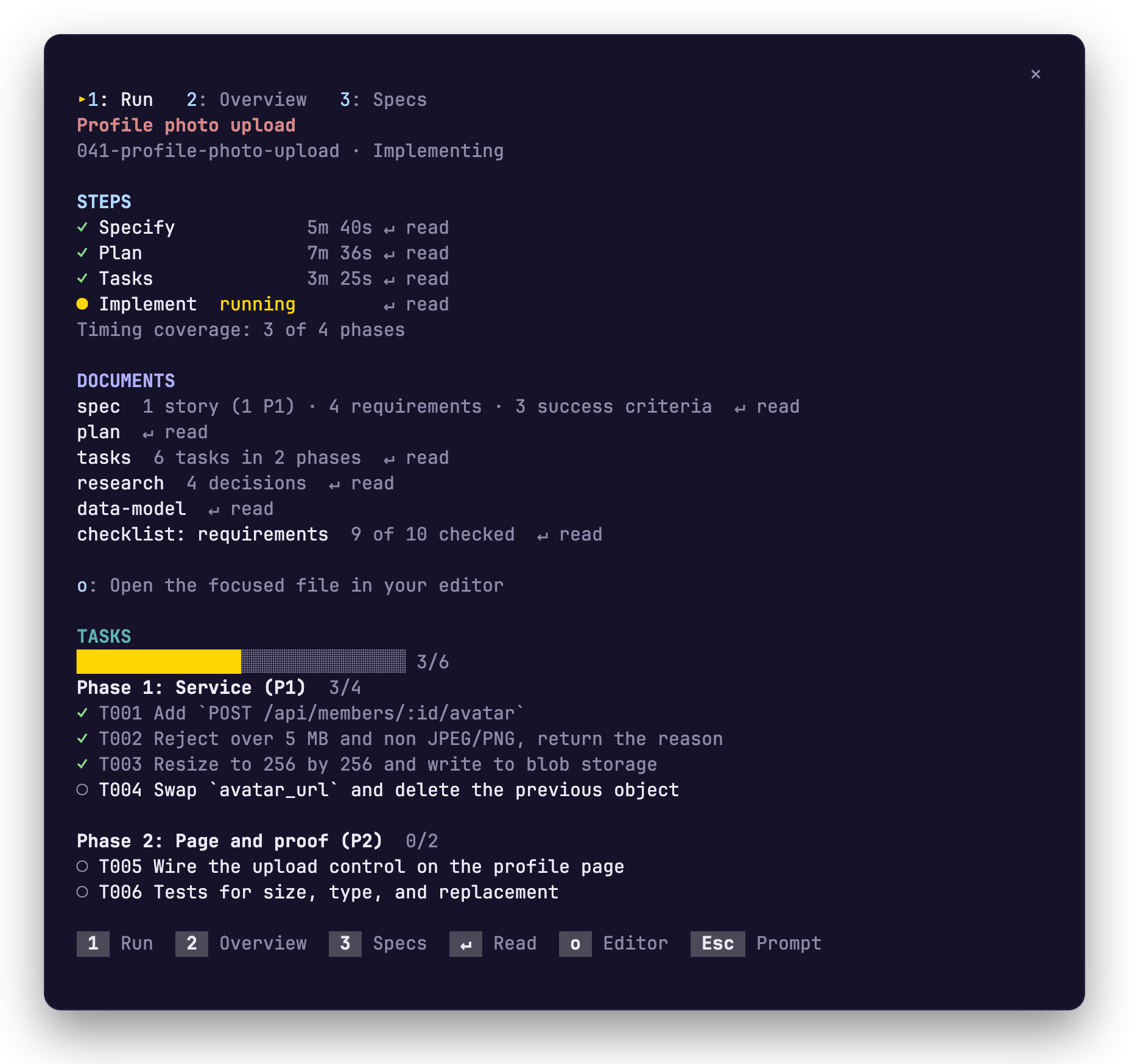
The pane a few steps later: each step with its time, the documents and the tasks. A run, step by step follows one spec from specify to implement.
If nothing shows, run /reload-plugins, then widen the terminal or run /speckit-tracker. The pane opens by itself only in a wide terminal.
Update it, or fix it
Section titled “Update it, or fix it”Update later has the command for each piece. If something did not work lists what you might see and what to do.
Related
Section titled “Related”- What it shows covers the band and the pane.
- A run, step by step follows one spec from specify to implement.
- Switch specs with /speckit-tracker changes the spec the mod follows.
- Install where you work says what each piece is and where it installs.