Living specs
A feature spec describes one change. Once it ships it is a record of something that happened. A year later, current behavior is the sum of thirty specs minus the parts later specs undid.
A living spec describes a capability, a piece of behavior your code keeps having. You register it once, keep it next to the code, and update it from the runs that change that code. Living specs come with the Companion Spec Kit extension.
A feature spec is done when the feature ships. A living spec never is. Nothing updates one automatically, and What stays manual says who does.
Turn it on
Section titled “Turn it on”Living specs stay off until you add living-specs.yml at the repo root.
enabled: trueexempt: ["*.config.*", "*.test.*", "**/migrations/**"]capabilities: - name: spec-viewer match: ["src/features/spec-viewer/**"] spec: src/features/spec-viewer/spec-viewer.spec.md - name: workflows match: ["src/features/workflows/**", "speckit-extension/workflows/**"]| Key | What it does |
|---|---|
enabled |
The opt-in. Without a registry, or with this unset, every living-specs command acts as if the feature were absent. |
exempt |
Globs that never count as drift. Default: *.config.*, *.test.*, **/migrations/**. |
name |
The capability id, and its folder name when the location is derived. |
match |
Globs whose files belong to it, minus the capability’s own exclude globs. |
spec |
Where the spec lives. Optional. |
layout |
central or colocated, which is the layout adoption uses for a capability you do not place yourself. Defaults to central. |
An older livingSpecs: block in .specify/companion.yml is still read. If both exist, living-specs.yml wins.
The Workflow Builder edits enabled and layout from its Living specs chip, and lists the capabilities, the exempt globs and the rules read-only. It writes into whichever of the two files is in force, so the setting lands where it is read from.
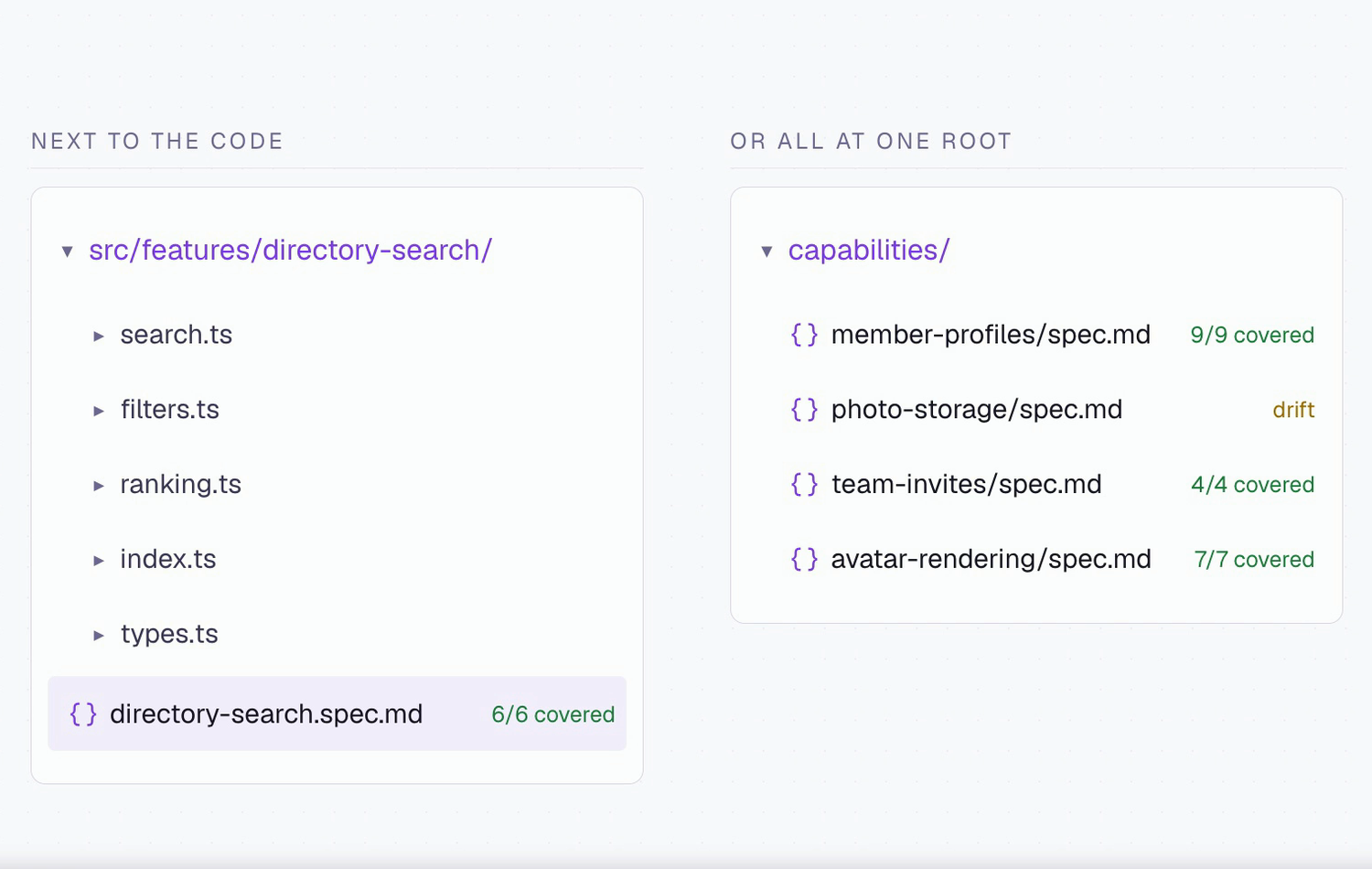
Where the spec lives
Section titled “Where the spec lives”| Layout | How | Where the file goes | Suits |
|---|---|---|---|
| Colocated | Give a spec: path |
Beside the code, as <something>.spec.md |
A capability that lives in one folder |
| Central | Omit spec: |
capabilities/<name>/<name>.spec.md |
Code spread across many folders |
You can mix both. The sidebar’s Living Specs tree mirrors your choice, and /speckit.companion.living-move switches a capability between layouts later.
Each spec has two siblings named from its stem.
| File | Holds | Written by |
|---|---|---|
<stem>.rules.md |
Conventions as plain bullets for people and assistants. The workflow does not load it. | living-adopt only |
<stem>.coverage.md |
Requirements mapped to tests. Feeds the coverage count. | Nothing. You write it. |
A capability without a coverage file shows no number, which is not the same as zero coverage.
- Most specific wins. A file matching several capabilities goes to the one with the longest literal path prefix, then by name.
- A nested registry is a separate project. The scan stops at a subfolder with its own
living-specs.yml. - Orphans. A spec file no capability claims appears under Orphans, hidden when there are none.
In the sidebar and the viewer
Section titled “In the sidebar and the viewer”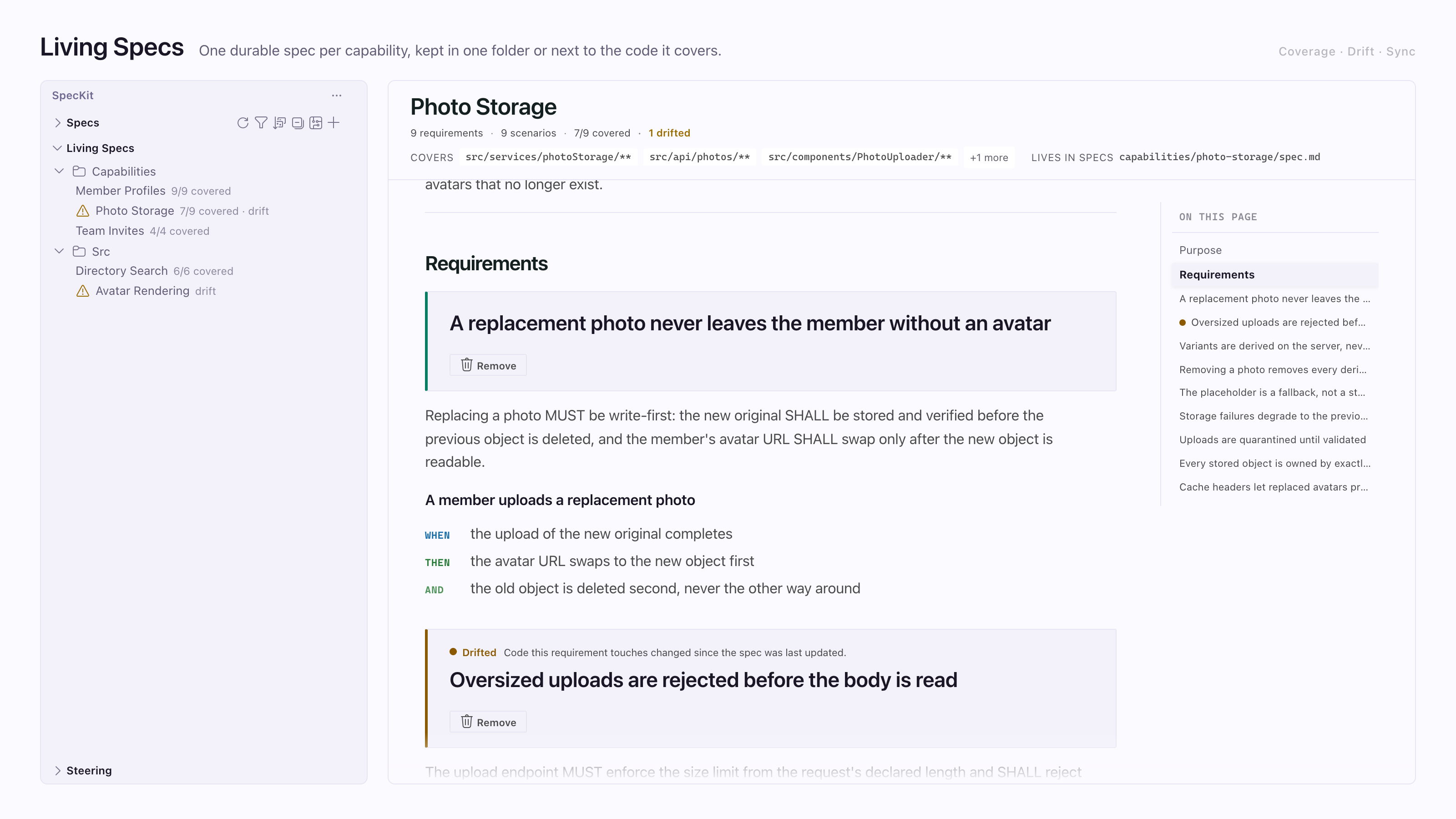
The sidebar covers the tree, and Reading a spec covers how a living spec looks in the viewer.
The commands
Section titled “The commands”All seven are /speckit.companion.living-<verb>.
| Command | What it does | Kind |
|---|---|---|
living-adopt |
Drafts a spec for one code area you name, then registers it. Marked as a starting point. | Assistant work |
living-sync |
Rewrites the affected specs from your current changes | Assistant work |
living-drift |
Lists source files changed since each spec was last committed, split into those that went through the workflow and were never folded back, and those the spec never saw. Committed history only. --working adds uncommitted edits. |
Script |
living-coverage |
Reports what each coverage file says. --capability <name> limits it. |
Script |
living-show |
Prints a requirement list, one requirement, or the requirements for one file. Read-only. | Script |
living-validate |
Checks spec and delta shape: no scenario, missing WHEN or THEN, duplicate heading, delta pointing nowhere. Read-only. | Script |
living-move |
Moves a capability between layouts and rewrites the registry, after confirming | Script |
Scripts give repeatable answers. Adopt and sync are prompts, so their quality is your assistant’s.
How a run folds back
Section titled “How a run folds back”The band across the top of this diagram is the loop: a run reads the requirements that apply when it starts and writes its changes back when it completes.
Living specs, when the project turns them on
Going in
Load only what applies
Specify loads only the requirements for the files the change touches and records which capabilities they came from. Plan reuses that list. Each implement worker gets the requirements for its own files.
In the repo
One lasting spec per capability
Requirements and scenarios that outlive any one change.
Coming out
Fold the changes back
The feature spec says what the change added, modified, removed or renamed. At completion the fold writes that into each capability's spec. A malformed change is refused for its own capability only. Folding twice changes nothing.
01
Specify
The spec and its requirements checklist. Sizes the change.
Several code areas: up to four readers, extra areas share one.
02
Plan
The plan, with research, data model and contracts as the size warrants.
Several areas or documents: readers per area, then a writer per design document.
03
Tasks
The task list, laid out in waves. Every file has one owning phase.
No workers. One pass.
04
Implement
The code and its tests. Ticks each task and runs the project's own checks.
Workers for groundwork and for each large story, below.
Inside implement
First
Shared groundwork, in waves
The work every story depends on. A wave of four or more tasks goes to up to four workers, a smaller one is built in place, and the next wave waits for every worker.
Then
One worker per large story
- P1 story: worker
- P2 story: worker
- Small story: no worker
A story that owns five or more files gets a worker and the requirements for its files. Stories never share a file.
Join
Check, then merge
Each worker appends its own finishes and reports what it built, never file contents. The run checks each claim is on disk, then merges the finishes and ticks the tasks one at a time.
Then
Completed
Once every task is checked and the checks pass, implement marks the spec completed. Mark-complete is the same path, for recovery.
Folds the living-spec changes back.
Optional, outside the run
Spec Kit's converge
On a spec not yet completed, usually one a stock Spec Kit run leaves at implemented, converge checks the code against the spec, plan and tasks, then adds a phase of tasks or reports converged. It never changes the status, and completion does not wait for it.
- Time. A step counts only when its start and finish were both recorded by a writer the run trusts, and it ends at its own first finish. A wait between steps counts toward nothing.
- A small change. Specify writes a short plan and task list itself, and the run goes straight to implement.
- One piece of work, or no way to start workers? The step does it itself and writes the same files.
A delta is a block a run adds to its own feature spec to say what it changed about a capability.
## ADDED Requirements<!-- capability: spec-viewer -->
- The viewer re-anchors a stored comment onto the freshly rendered page when its tab reopens.
The other headings are ## MODIFIED Requirements, ## REMOVED Requirements and ## RENAMED Requirements. A block without a capability comment goes to whichever capability the changed files matched.
At mark-complete the assistant writes the blocks and a script folds each into its capability spec. Folding twice changes nothing. Because the blocks live in the feature spec first, they show up in that feature’s diff for review.
| Workflow | Deltas |
|---|---|
| SpecKit Companion | Each capability a run loaded must end with a delta or a recorded skip note. If not, the fold prints a receipt saying the loop did not close. It never blocks the run. |
| Spec Kit | None. Use living-sync afterwards. |
What stays manual
Section titled “What stays manual”- A spec stays current only if a delta was written at mark-complete, or someone ran
living-sync. - Drift and coverage never gate anything. They are read-only and always exit zero. Wrap them in CI if you want a gate.
- A capability with an uncommitted spec, or a CI checkout with too little history, is skipped with the reason named. The all-clear line means every capability was actually examined.
Where to start
Section titled “Where to start”Start with one capability, not a registry. Pick the area you explain most often and run /speckit.companion.living-adopt on it. Reading the draft is the fastest way to learn whether your capability boundary matches the code. Every command is in Commands.