Workflow Builder
The Workflow Builder draws the Companion pipeline your project runs as a board. Each step is a lane, and each lane is built from nodes, small blocks of instruction your assistant reads. You change them on the board, then build.
Open it from the circuit icon at the top of the Specs view, or run SpecKit Companion: Open Workflow Builder. On a project without the Companion Spec Kit extension it shows the stock Spec Kit workflow instead.
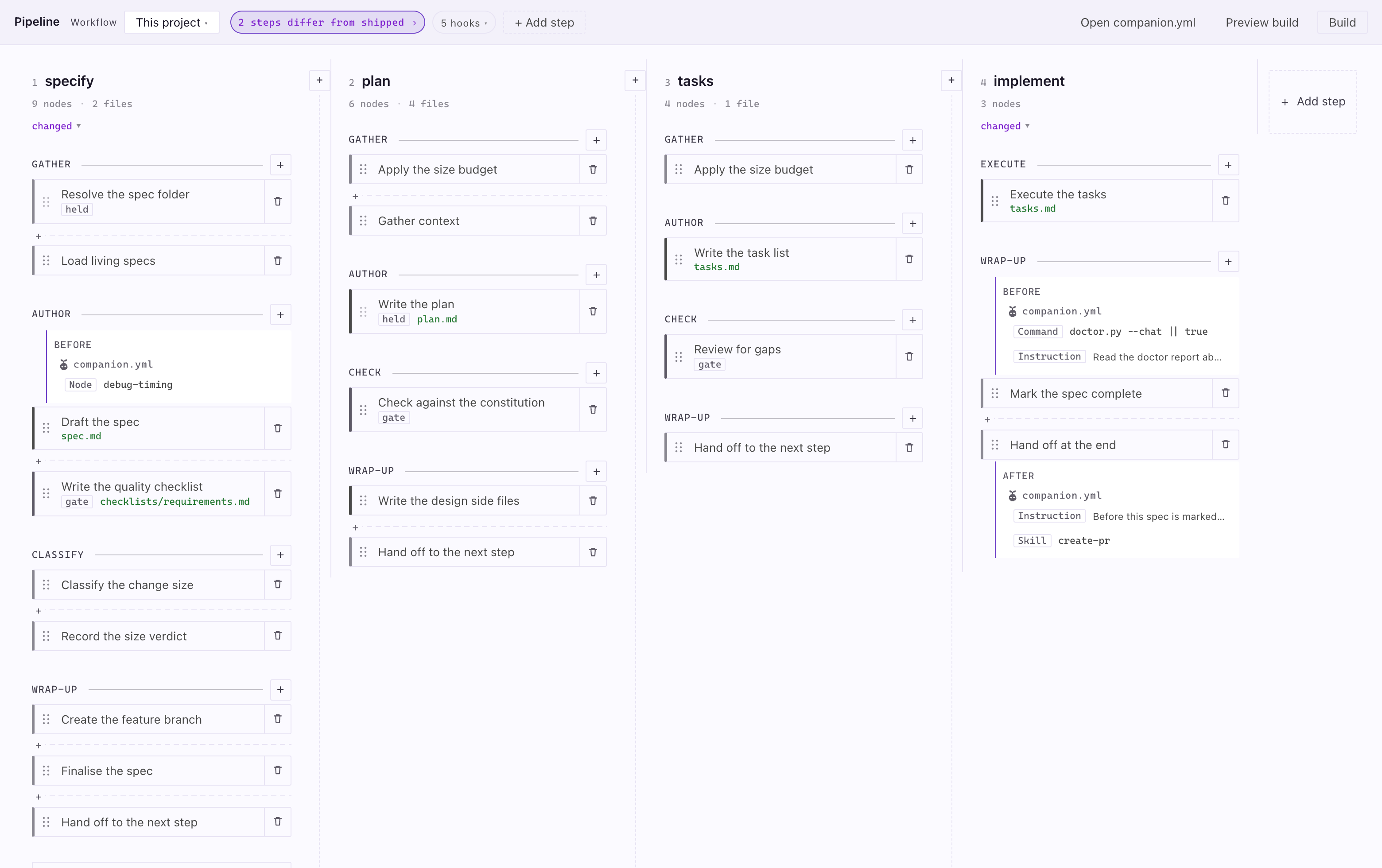
At the far right, Outside the run holds what does not take a turn, such as auto, which runs the other steps hands-off.
What the marks on a lane mean
Section titled “What the marks on a lane mean”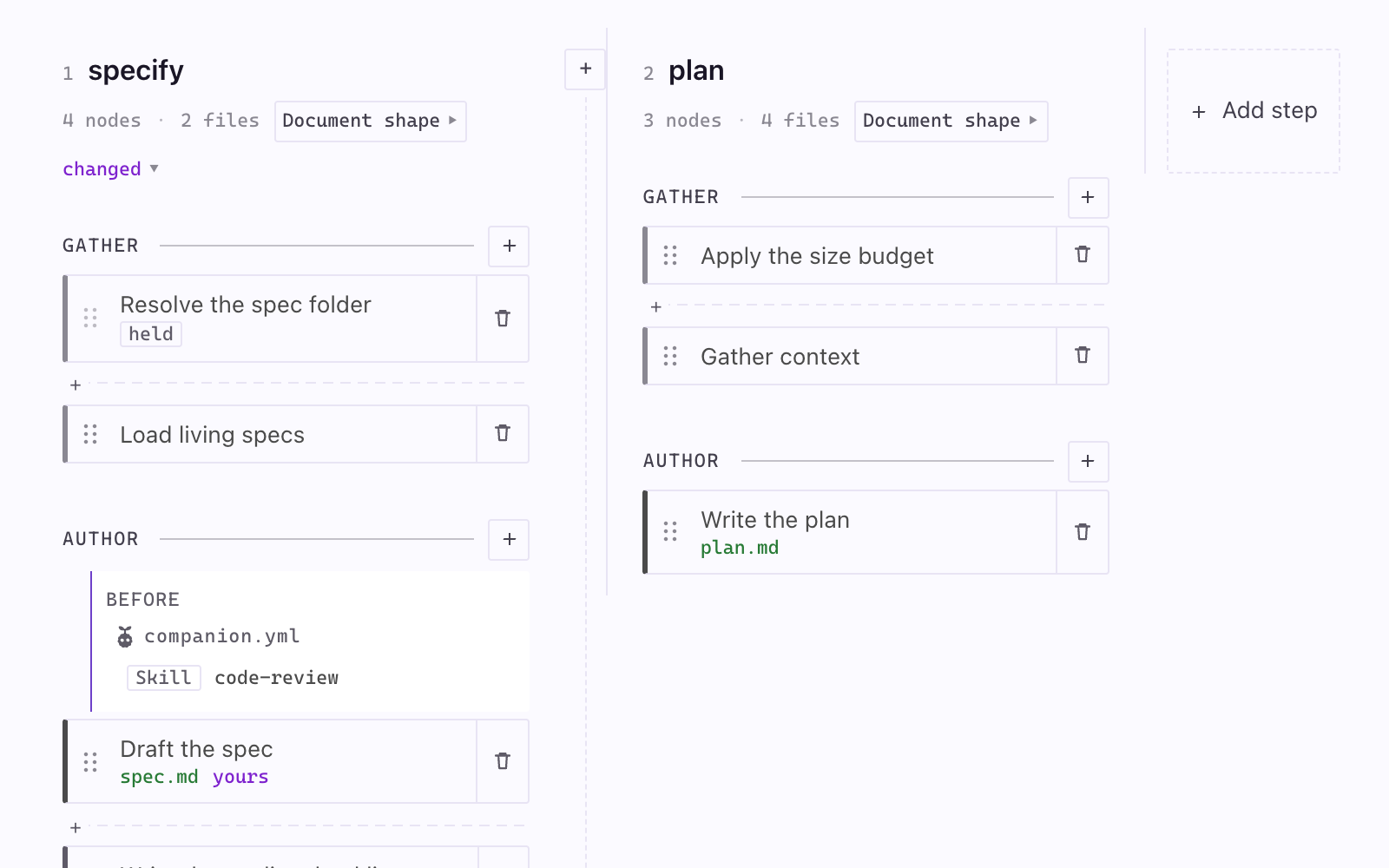
| Mark | What it means |
|---|---|
| specify, plan | A step. Click the name to read its preamble, the text every node in it sits under. |
changed |
This step differs from the workflow as it ships. |
4 nodes · 2 files |
How many nodes it runs and how many files a run produces. Hover names the files. |
Document shape |
The shape of the document this step writes. Click to change it. |
| GATHER, AUTHOR | A phase, a group of nodes. |
| A card | A node: one piece of instruction the assistant reads. |
| The bar on a card’s left edge | Node kind. Heavy writes a deliverable, light reads context or sets up. |
gate |
This node can stop the run. |
held |
This node cannot be reordered, because something after it reads what it writes. |
yours |
You rewrote this node. |
spec.md in green |
A file this node produces. |
before, after |
Work attached on that side of a node. |
+ on a dashed rule between cards |
Attach work exactly there. |
+ in the gap between two lanes |
Add a step there. |
The header
Section titled “The header”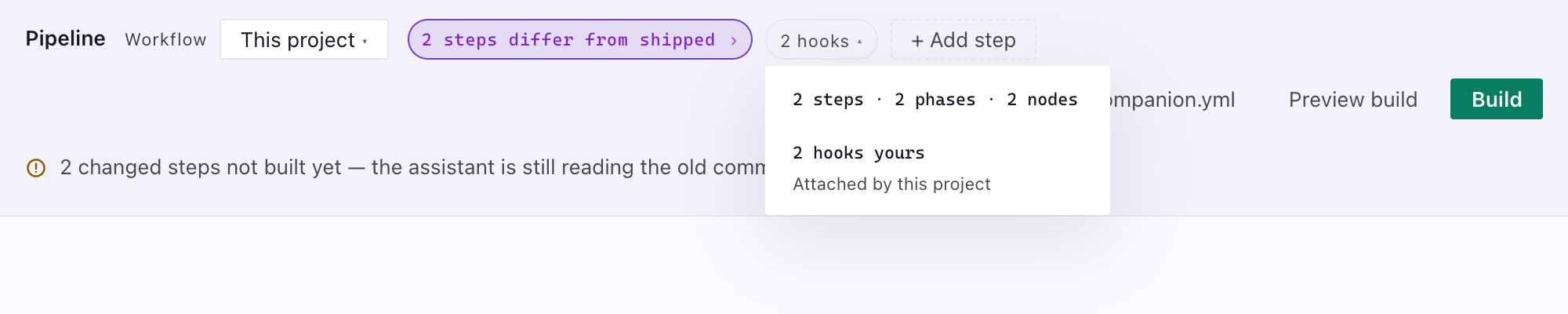
| Control | What it does |
|---|---|
| Workflow | Names the configuration you are on, and switches to another |
| Changes chip | No changes or 2 steps differ from shipped. Click it to scroll to the first lane that differs. |
| Hooks chip | 5 hooks. Opens the tally of steps, phases, nodes, your hooks and extension hooks. |
| Living specs chip | Living specs · 3 capabilities, or Living specs off. Opens the living-specs settings. |
| Add step | Appends a step |
| Open companion.yml, Preview build | Open the file, or list what a build would change. Docked narrow, both move under ⋯. |
Docked beside the editor
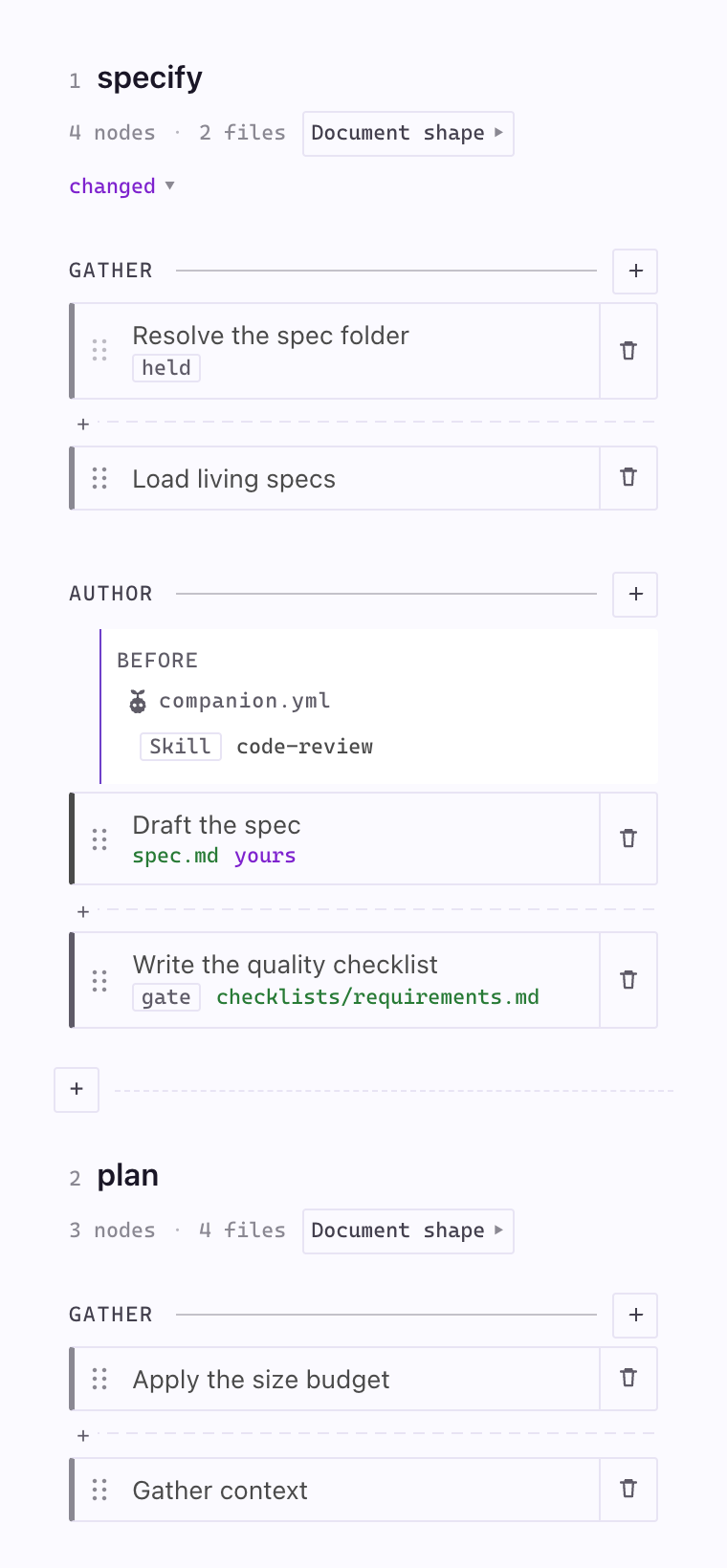
Section titled “Docked beside the editor”Dock the panel narrow and the steps stack one under the next at the panel’s width. Nothing is cut off or hidden behind a sideways scroll, and every control works the same.
Edit a node
Section titled “Edit a node”| You do | What happens |
|---|---|
| Click a node | Its panel opens with the instructions, what the node writes, what it needs first and whether it can move |
| Press Edit, change the text and Save | Your version is written to .specify/companion/nodes/ and the node is marked yours. The shipped file is untouched. |
| Press Preview build | Lists which commands would change. Nothing is written. |
| Press Build | Writes the command files. The header says what it wrote and when. |
Nothing takes effect until you build. Every write says what it did at the foot of the panel, with an Undo until the next write.
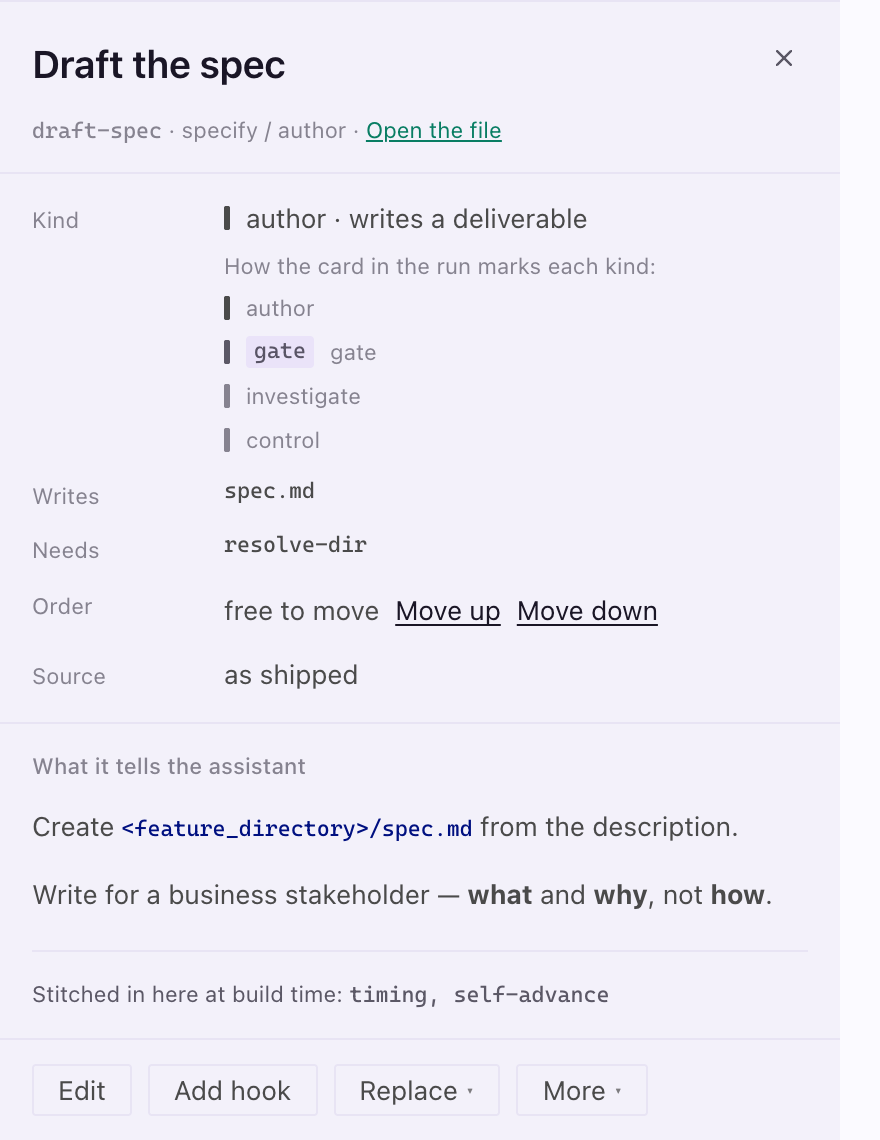
To go back, open More and choose Use the shipped node. The status line offers Undo.
Move a node
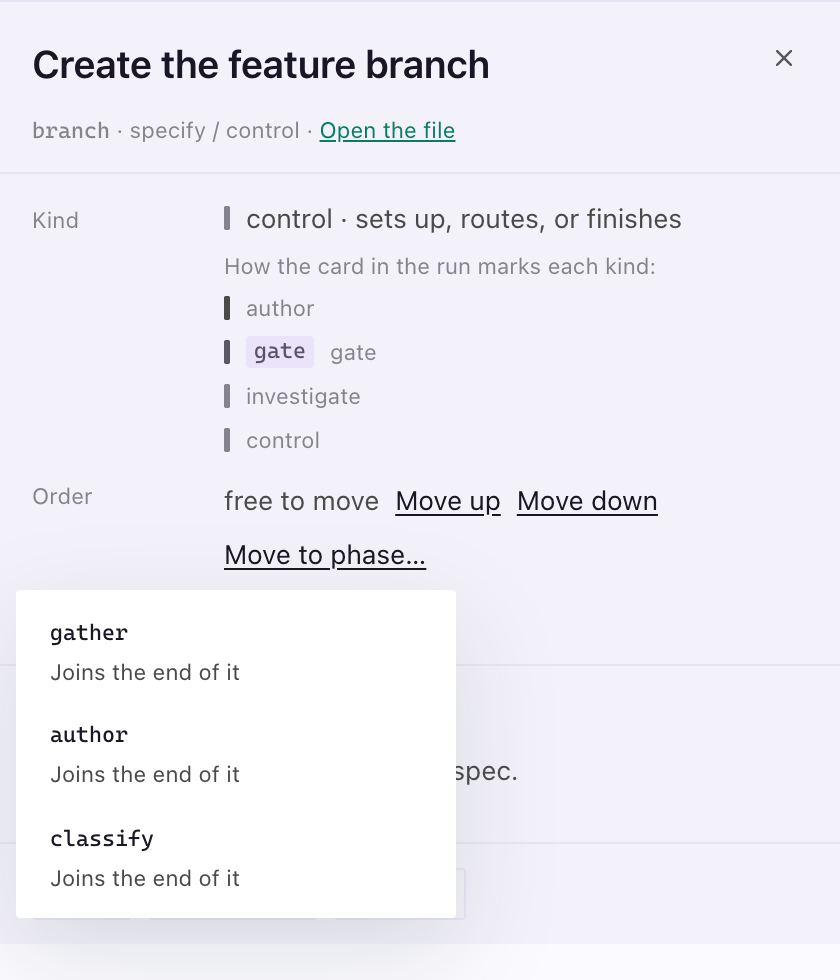
Section titled “Move a node”Drag a node to reorder it, or use the Order row in its panel.
| Control | Result |
|---|---|
| Move up, Move down | Steps the node through its phase |
| Move to phase… | Lists the other phases of the step. The node joins the one you pick at the edge nearest where it was: the end of an earlier phase, or the start of a later one. |
A node marked held has to stay where it is, and its row says why.
Replace or add a node
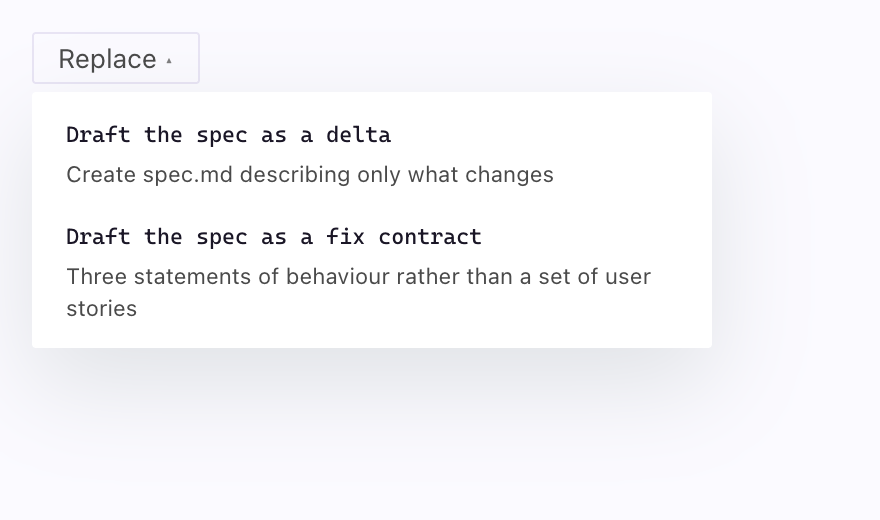
Section titled “Replace or add a node”A node with alternatives has a Replace menu, and your hooks move with it.
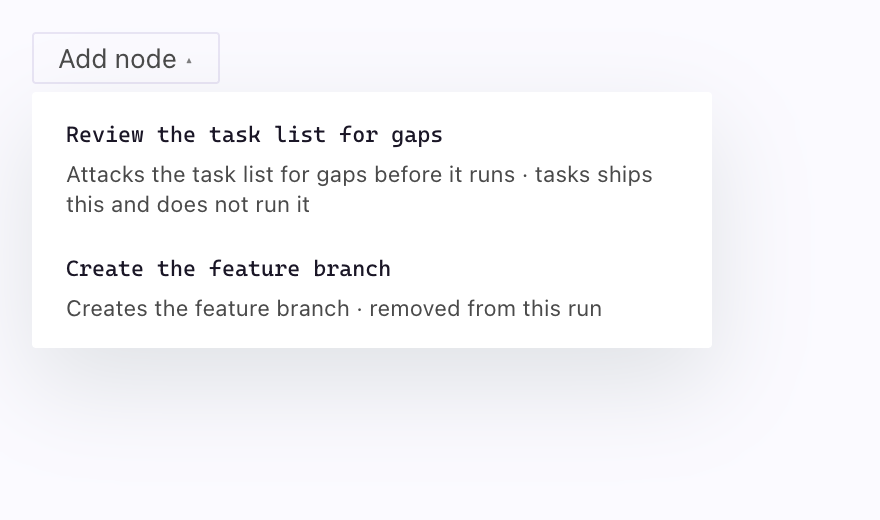
Add node in a phase’s + menu offers add-ons that ship switched off, and nodes you removed earlier.
Change a phase
Section titled “Change a phase”The + on every phase rule is the one control the board never hides. It offers Add hook, Add node, Rename phase, Split phase and Merge. A row that cannot run is greyed with the reason, such as “one node here, so there is nothing to split off”.
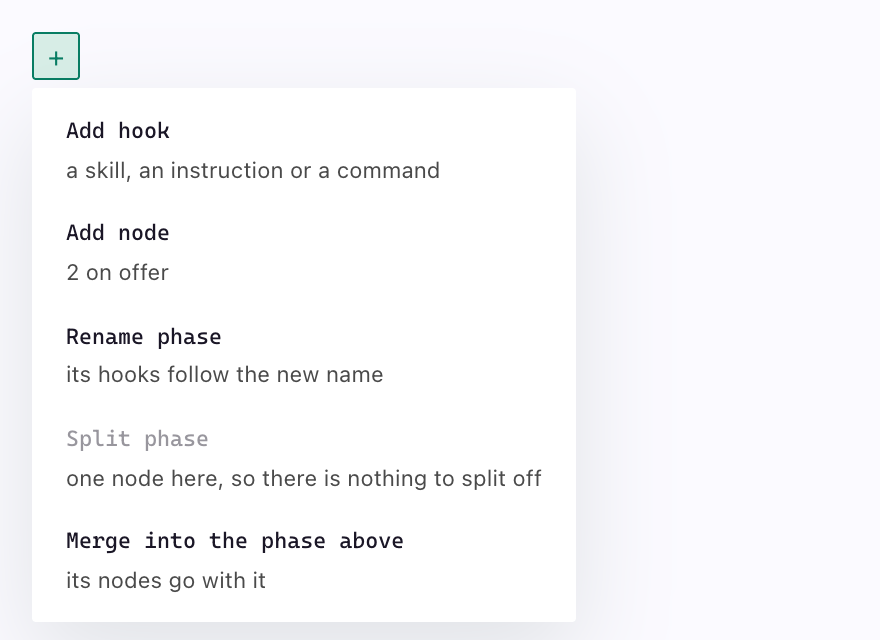
Hooks covers Add hook.
Change where a decision routes
Section titled “Change where a decision routes”One step in the pipeline branches. specify ends with classify-size, which judges how big the change is, and each answer it can give sends the run a different way: simple skips plan and tasks, normal runs everything, oversized prints a notice and then runs everything.
The block at the foot of the lane draws that routing. Change the routing opens one row per answer the node can give.
| You do | What happens |
|---|---|
| Tick a step under Skips | That answer folds the run past it |
| Untick everything | That answer runs every step |
| Type under Warns | The run prints that line before it continues. Empty prints nothing. |
| Press Save routing | Written to commands.<step>.decisions in your configuration, and the answer is marked yours |
| Press Use the shipped routing | Removes your entry, so the answer routes the way Companion declares it |
The answers themselves come from the node that decides, so this board changes where each one goes and not what can be answered. A step cannot skip itself, and a step that does not exist is refused before anything is written.
Living specs
Section titled “Living specs”The Living specs chip in the header opens the other half of what a Companion run reads: whether living specs run at all, where the specs live, and which capabilities have been registered.
| Setting | What it does |
|---|---|
| Runs | Turns living specs on or off. Off keeps the registry — nothing is deleted. |
| Specs live | Central keeps every spec under capabilities/. Beside the code puts each spec in the folder it describes. Chosen once, so adoption stops asking. |
Capabilities, Exempt and Rules are shown and not editable here. Adoption and the capability commands write them, and a second writer for that file is how two tools come to disagree about what a project has adopted. The line under the title says which file answered: the registry at your project root, or the older livingSpecs: block inside companion.yml.
To register a capability, run /speckit-companion-living-adopt.
Reshape a document
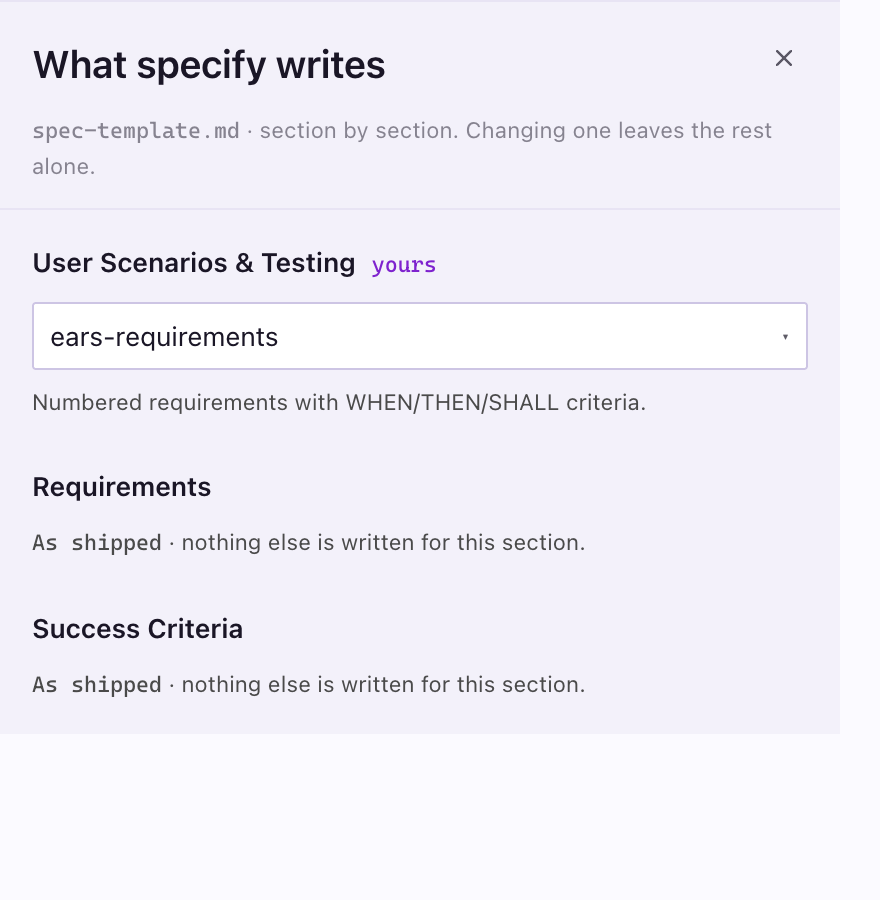
Section titled “Reshape a document”The Document shape chip on a step lists each ## section of its template. Pick an alternative for a section, or As shipped.
Add a step
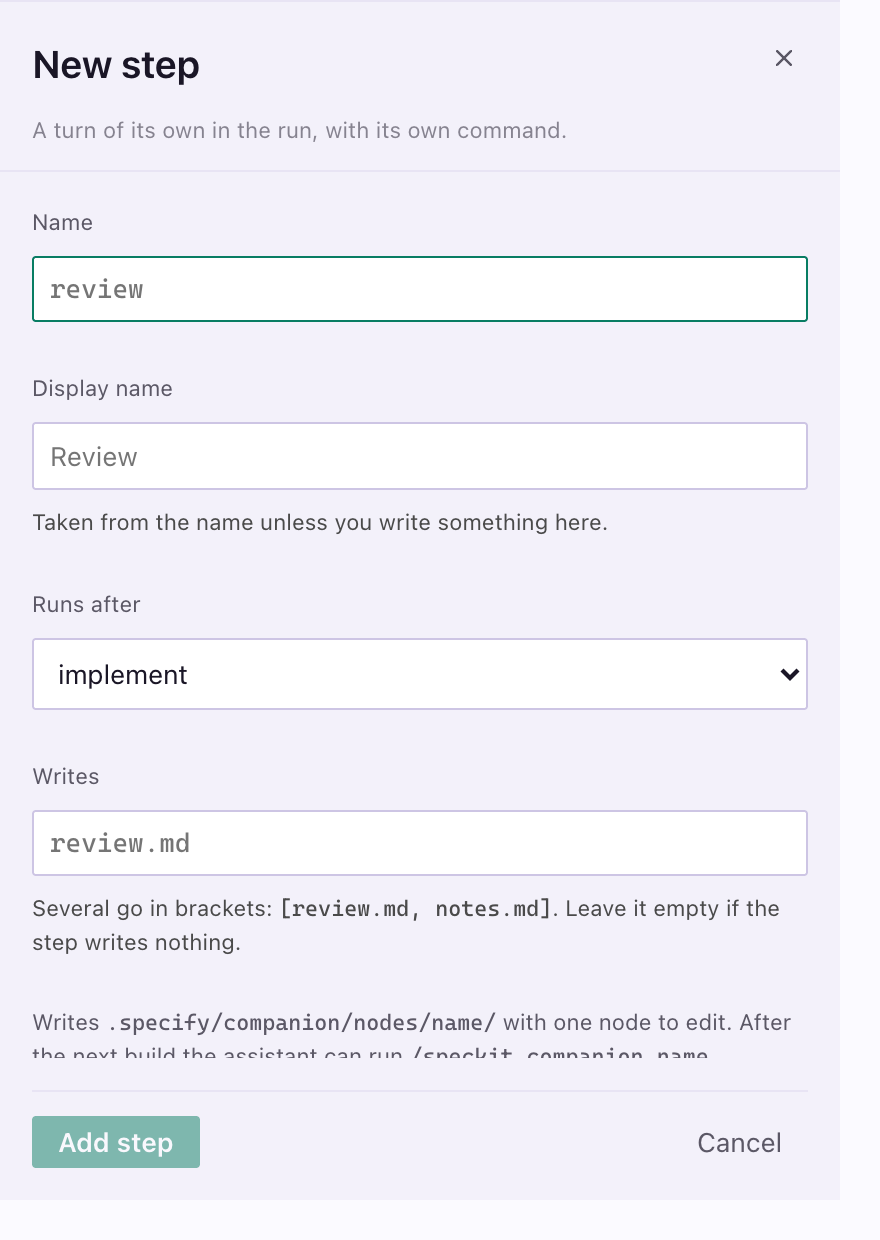
Section titled “Add a step”Press Add step in the header, or the + between two lanes. Give it a name and say where it runs and what it writes. After the next build, your assistant can run it as /speckit.companion.<name>.
Switch workflows and start from a preset
Section titled “Switch workflows and start from a preset”A workflow here is a whole named configuration. Switching swaps node order, hooks, templates and routing at once, so a one-line fix and a client deliverable can run different workflows in one repository. Nodes and document sections are shared across them.
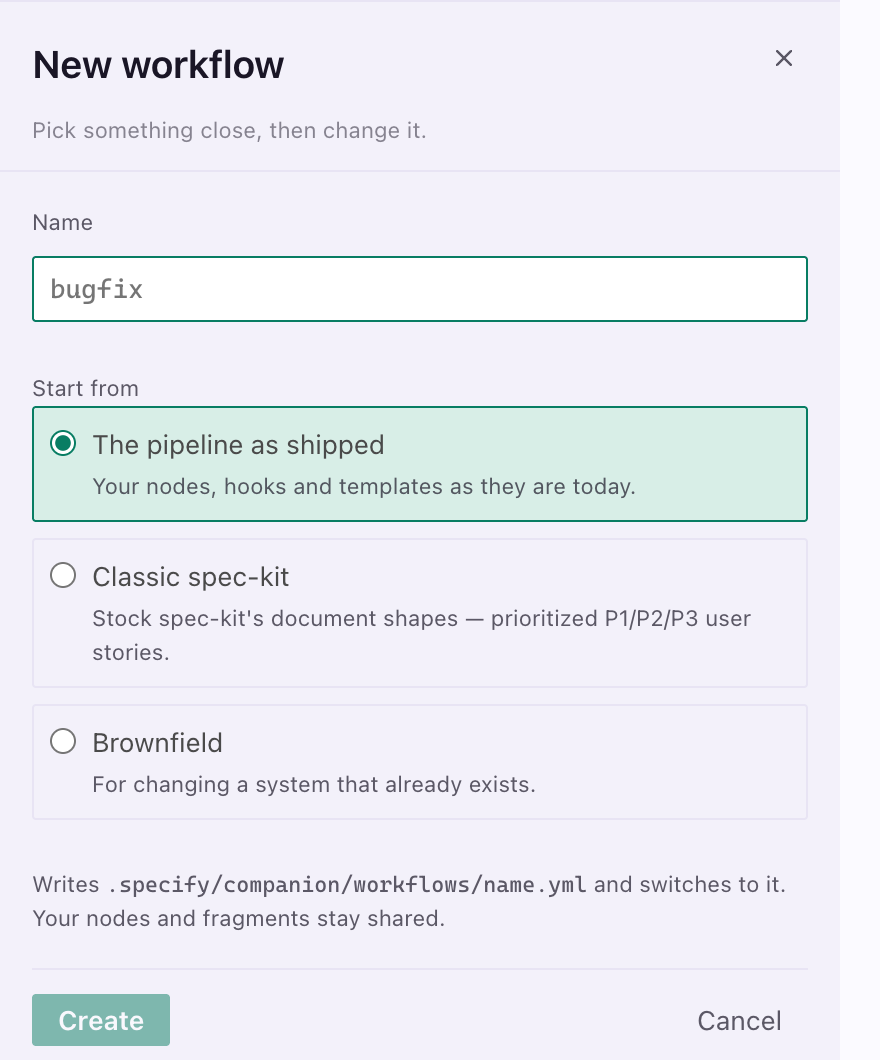
| Start from | For |
|---|---|
| What you run today | A variation on your current configuration |
| Classic spec-kit | Stock Spec Kit document shapes: prioritized P1/P2/P3 stories, the full Technical Context block. Changes how documents look, not what the run does. |
| Brownfield | Changing an existing system: the spec as a delta, folders numbered against every branch, the task list challenged before it runs, a person opening the result before it counts as done. |
A preset is copied in and yours to change. To compare with the shipped workflow, choose As shipped in the Workflow dropdown. Your configuration is parked, not deleted.
Build writes the command files your assistant loads, with your hooks, nodes and reshaped templates in place. Show the log opens the detail.
A failed build changes nothing. It names the step and leaves the working workflow as it was.
Files it reads and writes
Section titled “Files it reads and writes”| Path | What it holds |
|---|---|
.specify/companion.yml |
Your configuration, the source of truth |
living-specs.yml |
Which capabilities you registered, and whether living specs run |
.specify/companion/workflows/<name>.yml |
A named configuration you can switch to |
.specify/companion/nodes/<step>/<node>.md |
A node you rewrote, or a step you added |
.specify/companion/fragments/<name>.md |
A document section you wrote |
.specify/extensions/companion/commands/ |
What a build produces. Never edited by hand. |
If the panel cannot draw, it offers repairs as buttons, narrowest first. Open companion.yml is always there.
A project without the Companion extension
Section titled “A project without the Companion extension”On a project that runs stock Spec Kit the board draws that project’s own workflow, read from its files: .specify/workflows/ when a workflow is installed, otherwise the /speckit.* commands your assistant has. Each step shows in run order with the documents it writes and the extension hooks attached to it.
Everything it changes there is Spec Kit’s own.
| On a stock project | What happens |
|---|---|
| A hook’s checkbox | Writes enabled: true or false into .specify/extensions.yml, the file Spec Kit reads. Nothing else in that file moves. |
| A document shape row | Opens that template from .specify/templates/ in an editor tab. Spec Kit reads it on the next run. |
| The constitution | Sends /speckit.constitution to your assistant, in the spelling your project registers. A command owns that document, so the board does not edit it. |
| A workflow row | Draws that installed workflow here. Open opens its workflow.yml. |
| Build | Disabled. A build assembles Companion’s command files, and this project has none. |
Which workflow a run takes is chosen when the run starts, with specify workflow run <id>; Spec Kit’s registry records no active one, so there is nothing on the board to set.
Nothing is written to .specify/companion.yml or .specify/companion/ on a stock project, and the board draws no Companion-only controls. Nodes, phases, your own hooks and the rest arrive with the Companion extension for Spec Kit, from Install in VS Code.
Related
Section titled “Related”- Hooks attaches your own work to a node, a phase or a step.
- Your own workflow covers the same file by hand, and the custom workflows you write in VS Code settings, which this board does not edit.