Choose an AI provider
SpecKit Companion does not run a model of its own. It sends each command to the AI assistant you already use, so the first thing it needs is to know which one.
The first-start picker
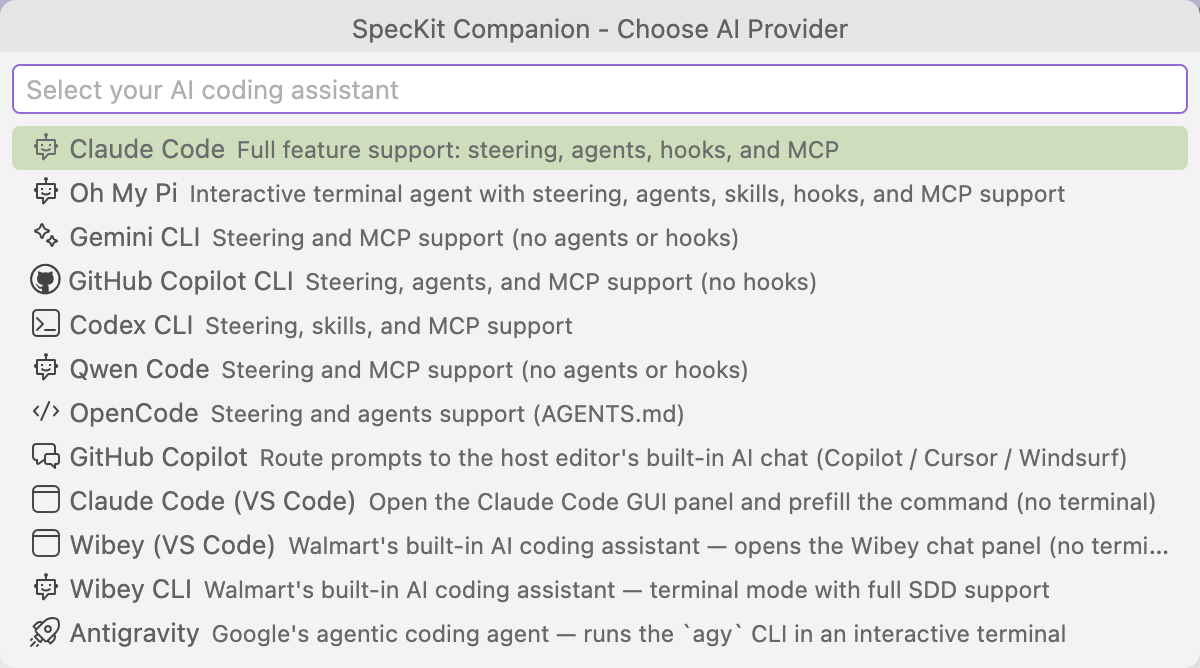
Section titled “The first-start picker”The first time the extension starts with no provider set, a picker titled SpecKit Companion - Choose AI Provider opens at the top of the window and asks you to select your AI coding assistant. Each row is one assistant, with a line saying what it supports, such as steering, agents, hooks and MCP.
| You do | What happens |
|---|---|
| Pick an assistant | The choice is saved to your user settings, so it applies in every project, and the extension finishes starting |
| Close the picker without picking | The extension does not start, and a message says a provider is required. The picker opens again the next time the extension starts. |
Change it later
Section titled “Change it later”The choice is the speckit.aiProvider setting. Open Settings, search for speckit.aiProvider, and pick another assistant from the dropdown. Every step you run after that goes to the new one.
Choose the provider before you press Initialize Workspace in a new project, because that sets the project up for the assistant named in the setting.
If a project was set up for a different assistant than the one in your setting, Companion says so when it starts and lets you switch or keep yours. It never changes the provider on its own.
Related
Section titled “Related”- Providers lists every assistant, how each one is reached and which files it reads.
- Configuration covers the rest of the settings, including permissions.
- Your first spec creates a spec and runs its first step.